 Cognetivy
Cognetivy is an open-source state layer for AI coding assistants that adds workflows, run tracking, and persistent collections.
Your agent's work, in full view
Studio is a local browser UI that connects directly to your .cognetivy/ workspace. Inspect workflows, runs, events, artifacts, and collections - all without leaving your machine.
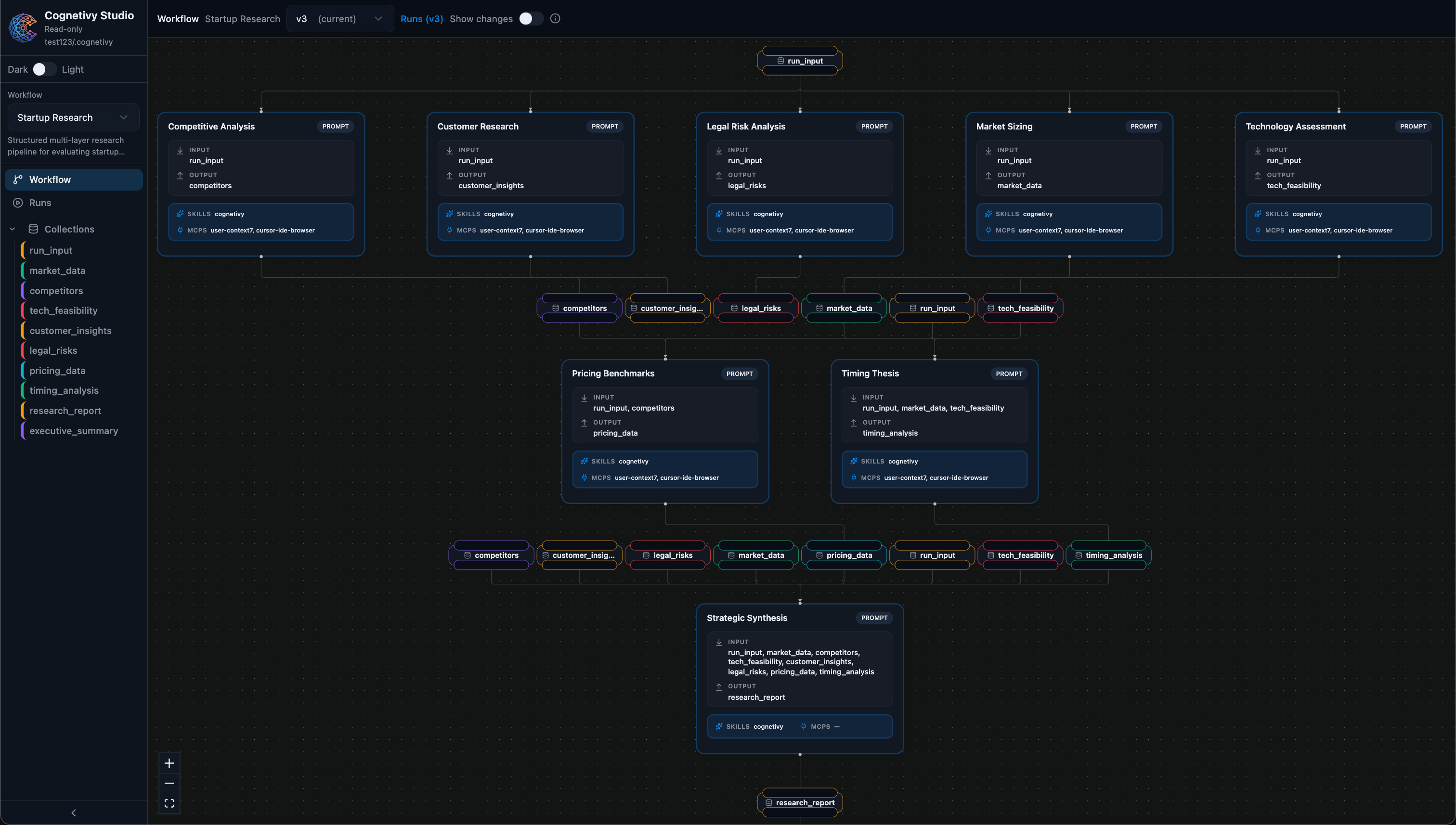
Workflow canvas
Visual DAG of your agent's process
Run timeline
Every run, status, and duration
Event stream
Decisions and tool calls in order
Collections
Structured data across all runs
Everything your agent did, at a glance
Studio surfaces six interconnected views, all reading from the same local workspace your agent writes to.
Workflow canvas
See your workflow as a DAG, nodes and edges laid out visually so the shape of the task is always obvious.
Run timeline
Every run is listed with its status, start time, and duration. Jump straight into any run for a full breakdown.
Event stream
Each run records every event your agent fired, decisions, tool calls, and step completions, in order.
Artifacts
Structured data your agent saved is shown in a clean schema view. Browse, diff, and share without editing.
Collections
Organized groups of items produced across runs. Filter, inspect, and trace each item back to its source run.
Instant launch
One command opens Studio in your browser, connected to your local workspace. No cloud, no account needed.
From run to review in seconds
Studio requires no setup beyond installing Cognetivy.
Run your agent
Let Claude Code, Cursor, or any MCP-compatible agent work through a workflow in your project.
Open Studio
Run "npx cognetivy" in your terminal. Studio opens in the browser, reading directly from your .cognetivy/ workspace.
Inspect everything
Browse the workflow canvas, step through the run timeline, and examine every artifact, all read-only and fully local.
Launch Studio with a single command
Opens at localhost:3742 - no cloud, no account
Read-only. Local. Private.
Studio never modifies your workspace. It reads what your agent wrote and presents it cleanly. No data leaves your machine - your workflows, runs, and artifacts are yours.
- ✓No account or sign-in required
- ✓All data stays in your local .cognetivy/ folder
- ✓Read-only - Studio cannot change your workspace
- ✓Served directly from the Cognetivy CLI
.cognetivy/ workspace
See your agent's work clearly
Install Cognetivy and open Studio in under a minute.