 Cognetivy
Turn agent chaos into structured workflows
Define how your AI assistant works, track every run, and keep reasoning in one place. Works with Cursor, Claude Code, OpenClaw, and any MCP-compatible agent.
Works with

| Platforms | Cursor, Claude Code, OpenClaw, MCP and any MCP-compatible agent |
|---|---|
| License | MIT, open-source |
| Data & runs | Stored locally in .cognetivy/; no cloud or LLM in the engine |
Why Cognetivy
AI coding agents are great at producing output, but their process is usually hard to inspect and impossible to repeat. Cognetivy gives your agent an operational layer: define how it works, track what happened, keep reasoning artifacts organized - all locally, with no LLMs involved.
Without Cognetivy
Context lives in chat history and disappears. Every run is a black box with no way to trace what happened.
With Cognetivy
Work is captured as workflows, runs, events, and collections inside .cognetivy/ - local, versioned, and inspectable.
Everything in one package
Workflows, runs, collections, and Studio - all open-source, all local.
Workflows
Explicit, repeatable steps - no more freeform prompts.
Run tracking
Every run logged: status, duration, and events.
Collections
Schema-backed data that persists across runs.
Studio
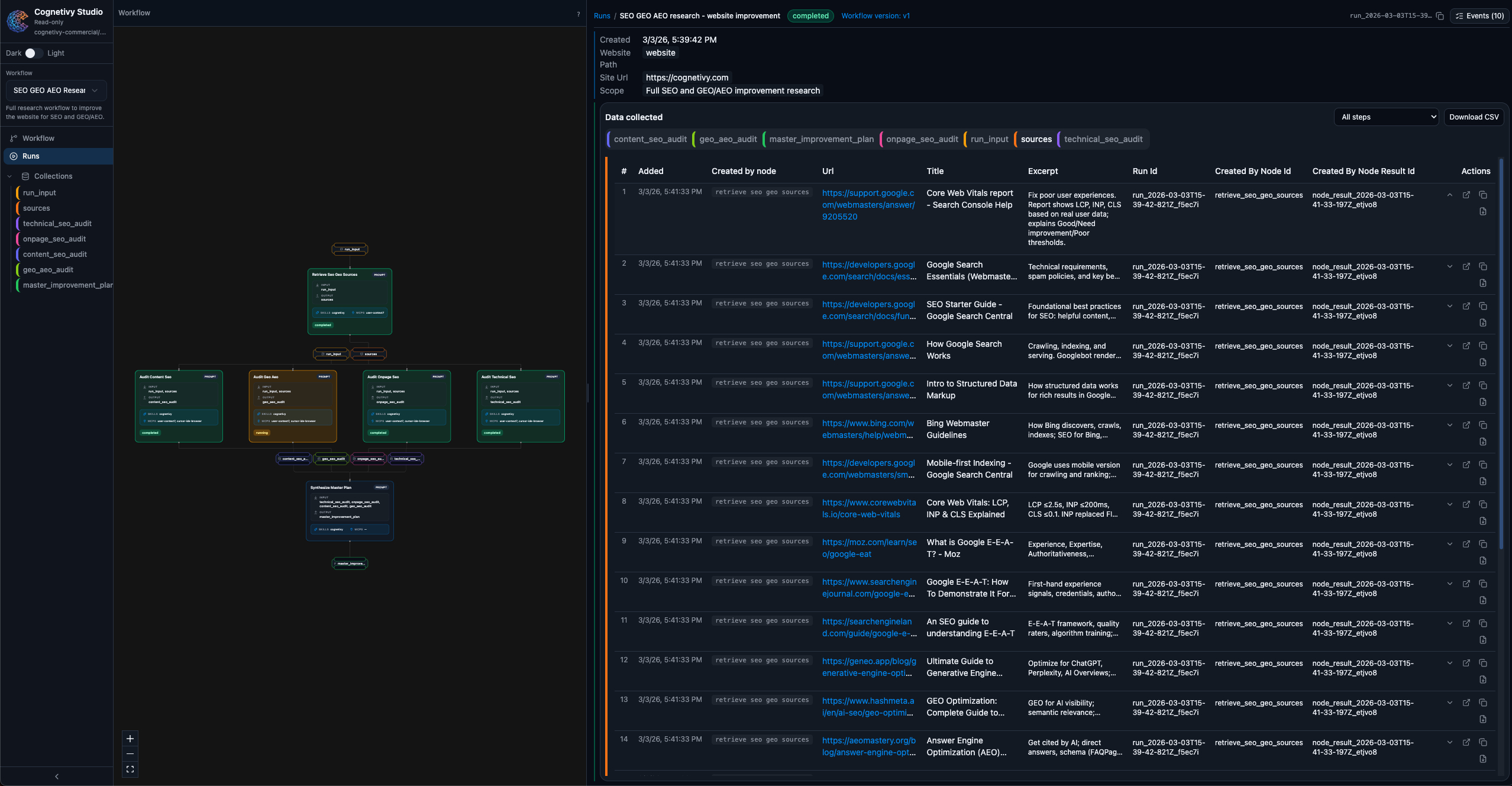
Browser UI to inspect everything - one command.
Process layer
Memory + structure between your editor and model.
Works anywhere
Claude Code, Cursor, OpenClaw, any MCP agent.
How it works
Three steps from chaos to structured, repeatable agent workflows.
Define your workflow
Tell Cognetivy how your agent should work: what steps to follow, what inputs to expect, and what to capture. Saved as a versioned workflow file in your project.
Let your agent run
Your agent (Claude Code, Cursor, etc.) reads the workflow, executes each step, and writes runs, events, and artifacts directly into your local .cognetivy/ folder.
Review and repeat
Open Studio to inspect what happened. Compare runs, browse collected data, and refine your workflow. Then run it again with confidence.
Use cases
From competitor analysis to code review - structured workflows for every team.
Frequently asked questions
What is Cognetivy?
Cognetivy is an open-source state layer for AI coding assistants that adds workflows, run tracking, and persistent collections. It works with Cursor, Claude Code, OpenClaw, and any MCP-compatible agent.
How do I get started with Cognetivy?
Run npx cognetivy once to install and configure your agent. Then ask your agent to create a workflow and start a run. Open Studio with npx cognetivy studio to inspect runs and collected data.
What platforms does Cognetivy work with?
Cognetivy works with Cursor, Claude Code, OpenClaw, and any agent that supports MCP (Model Context Protocol). No LLMs are involved in the workflow engine - everything runs locally in your .cognetivy/ folder.
Is Cognetivy free?
Yes. Cognetivy is open-source (MIT). You run it locally; there are no hosted services or usage fees. Your workflows, runs, and collections stay on your machine.
Where is my data stored?
All data lives in your project under the .cognetivy/ directory: workflows, run history, events, and collections. Nothing is sent to the cloud. You can version .cognetivy/ with Git.
How does Cognetivy work with my agents?
Install Cognetivy from your project root (npx cognetivy), then add the Cognetivy skill to your agent. Your agent can run workflows, start runs, complete steps, and write to collections via the CLI or MCP. See the integration guide in Docs.
What's the difference between a workflow and a run?
A workflow is the definition: the steps (nodes) and how they connect. A run is one execution of that workflow with a given input. You can start many runs from the same workflow and compare results in Studio.
One command to get started
Install Cognetivy and open Studio in under a minute. Works with Cursor, Claude Code, OpenClaw, and any MCP-compatible agent.